# Homepage
Live preview:
This guide explains how the homepage is built, which settings control each block, and how to customize each element.
### How homepage is composed
Homepage is rendered from `home.hbs` (route `/` with data: `page.home`) in this order:
1. Hero
2. Optional ribbons
3. Destinations section
4. Experiences section
5. Latest Articles section
6. Optional custom tag sections
7. Optional mid-page CTA (banner-alt) after the 2nd custom tag section
8. Final CTA (banner)
***
### Control map (Setting → Homepage Element)
| Setting / Content Source | Controls (Homepage Element/Section) |
| ------------------------------------------------------------------------------------------------------------------------------------ | --------------------------------------------------------------------- |
|
@custom.show\_home\_ribbons Setting in Ghost Admin
| Turns ribbons block on/off |
|
@custom.destinations Setting in Ghost Admin
| Destination tag pools for hero/nav/ribbons/destination cards/filters |
|
@custom.experiences Setting in Ghost Admin
| Experience tag pools for hero badges/ribbons/experience cards/filters |
|
@custom.tag\_slugs\_to\_show\_on\_home Setting in Ghost Admin
| Additional homepage tag sections |
|
page.home → title Title of page with slug home
| Hero headline |
|
page.home → custom excerpt Custom Excerpt of page with slug home
| Hero subtitle text |
|
page.home → feature image Feature Image of page with slug home
| Hero main image (highest priority) |
|
@site.cover\_image Publication cover image
| Hero image fallback if Home page feature image is empty |
|
page.home → content images Single images/Gallery images in content of page with slug home
| Hero slideshow sources |
|
page.home → featured toggle Featured toggle of page with slug home
| Optional alternate CTA shown after 2nd custom tag section |
***
### Required/Recommended Content Setup
For a complete homepage, create and maintain:
1. A page with slug `home` (used by route data).
2. Destination tags and Experience tags.
3. Theme settings with correct slug lists for `destinations` and `experiences`.
4. Optional page with slug `banner` for final CTA.
5. Optional page with slug `banner-alt` for mid-page CTA.
6. Optional pages with slugs `destinations` and `experiences` (used by hero mini-CTA cards when Home page is featured).
***
### Block-by-Block Customization
#### 1. Hero Section
**1.1 Headline and Subtext**
* Source: Home page Title + Custom Excerpt.
* Action: Edit the home page content in Ghost Admin.
Homepage Hero elements
**1.2 Hero Image Priority**
1. `home` page feature image.
2. Site cover image (Brand settings) if Home feature image is missing.
3. No media layout if both are missing.
Homepage feature image
**1.3 Hero Slideshow**
* Source: `` tags inside `home` page content.
* Behavior: Theme extracts content images and rotates them as background layers over the hero image.
* Tip: Add 3–6 high-quality images in Home page content for smoother visual rotation.
Homepage hero image slideshow
**1.4 Hero Floating Experience Badges**
* Source: tags listed in `@custom.experiences` (up to 12 queried).
* Behavior: Randomized badges with parallax/drag interaction.
* If tag has no feature image, initials placeholder is used.
* If no experiences are configured, this layer is not rendered.
Homepage floating badges. These are randomised and are randomly selected.
**1.5 Hero Newsletter Form**
* Rendered under heading/subtext only when page option check passes (`@page.show_title_and_feature_image` in template logic).
* Uses Ghost Members subscribe flow (`data-members-form="subscribe"`).
* Includes all newsletters as hidden inputs.
Hide/show Subscribe form in homepage hero
**1.6 Hero Destination/Experience Mini-CTAs**
* Only rendered if `home` page is marked **Featured**.
Hide/show homepage hero CTA buttons
* Pulls content from pages with slugs:
* `destinations`
* `experiences`
* Card content mapping:
* Card title = page title
* Card description = page excerpt
* Card image = page feature image
* Link = page URL
Homepage CTA buttons' content
**1.7 Ribbons Section**
* Toggle:
* Controlled by `@custom.show_home_ribbons` setting in Ghost Admin.
* If false, entire ribbons block is skipped.
* Data Source:
* Uses tags from:
* Both `destinations` + `experiences` if both are set
* Only one set if only one is configured
* Ribbon items are shuffled client-side for variation.
Homepage hero ribbon
***
#### 2. Destinations Section
**2.1 Data Source**
* Tag slugs from `@custom.destinations`.
* Max 10 tags shown.
* Card shows:
* Tag feature image or initials fallback
* Tag name
* Post count (`count.posts`)
**2.2 Link Target**
* Section header “View all destinations” goes to `/destinations/`.
Homepage destinations section
***
#### 3. Experiences Section
**3.1 Data Source**
* Tag slugs from `@custom.experiences`.
* Max 12 tags shown.
* Card shows:
* Tag feature image or initials fallback
* Tag name
* Post count badge
**3.2 Link Target**
* Section header “View all experiences” goes to `/experiences/`.
Homepage experiences section
***
#### 4. Latest Articles Section
**4.1 Data Source**
* Latest 15 posts (`published_at desc`).
* Mixed layout:
* 3 large cards
* 12 smaller cards in grouped columns
**4.2 What affects these cards**
* Post featured image (or placeholder fallback)
* Featured flag badge
* Membership access state badge
* Tags and destination chips
* Author profile images
* Reading time/date
Homepage latest articles section
***
#### 5. Custom Tag Sections
**5.1 Data Source**
* Theme setting: comma-separated tag slugs in `tag_slugs_to_show_on_home` setting.
* For each tag:
* Header uses tag name + link to tag archive
* Pulls latest 6 posts for that tag
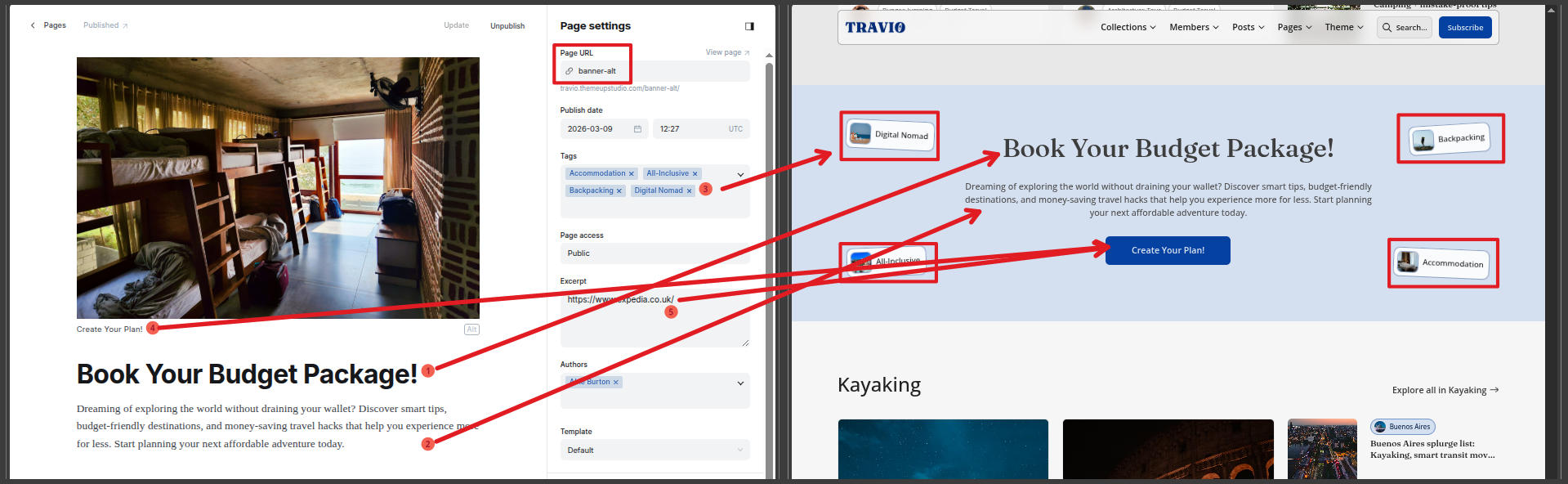
**5.2 Mid-page CTA insertion rule**
* After the 2nd custom tag section, theme inserts `section-cta-alt` automatically.
**6.2 CTA after 2nd Tag Section**
* Page slug required: `banner-alt`
* Similar mapping as of Final CTA at bottom.
* If page has tags, they render as interactive floating badges around the CTA. Maximum of 4.
Homepage CTA section after 2nd tag section
***
### Settings Checklist for Homepage
Set these in Customize → Theme:
* `destinations`: valid destination tag slugs
* `experiences`: valid experience tag slugs
* `show_home_ribbons`: true/false
* `tag_slugs_to_show_on_home`: optional additional tag slugs
Set these in Customize → Brand:
* Site cover image (hero fallback)
* Accent color (affects generated accent shades)
***
### Common Pitfalls
1. Home looks incomplete (or shows 404 error) because `home` page slug is missing.
2. Destination/experience sections empty because slug lists don’t match real tag slugs.
3. Hero mini-CTA cards missing because `home` page is not marked **Featured**, or `destinations`/`experiences` pages don’t exist.
4. CTA button not working because `banner`/`banner-alt` page excerpt is empty (excerpt is used as button URL).
5. Hero slideshow not rotating because Home page content has no images.